
Cloud & AI Systems (AWS)
Production RAG chatbot on AWS Bedrock, serverless AI architectures, and cloud ops projects. Built on Lambda, API Gateway, SambaNova.
NTCIP Traffic Controller Simulator (TCS)
Simulate a NEMA dual-ring 8-phase traffic controller. Adjust timing plans, watch phases cycle live, and explore real NTCIP 1202 MIB objects.
Live Traffic Dashboard
Live traffic incident map across U.S. cities with Leaflet.js, color-coded markers, real-time filtering, and auto-refresh.
Log Analyzer
Upload a server log and get an AI-powered summary of errors, anomalies, and key issues.
AI Resume ↔ Job Matcher
Upload your resume and a job description. Claude scores the match, flags missing skills, and highlights your strengths.
Text to Audio
Upload a .txt file and convert it to spoken audio with AWS Polly. Ten neural voices, adjustable speed.
About: NTCIP Traffic Controller Simulator (TCS)
An interactive browser-based simulator of a real NEMA dual-ring, 8-phase traffic signal controller — the same controller model used at intersections across the United States. Adjust cycle length, phase splits, and yellow clearance time, and watch a live 4-way intersection respond in real time. Built to learn and demonstrate the NTCIP 1202 standard.
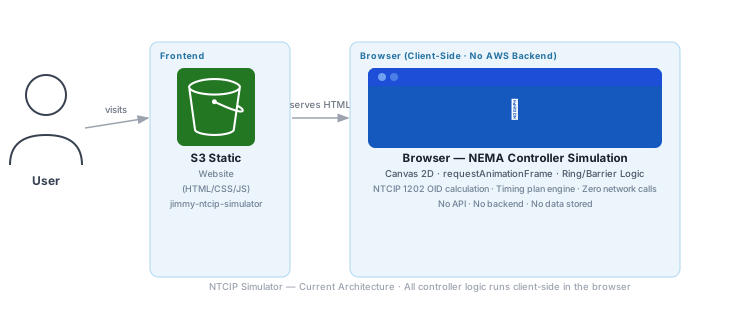
Key fact: Entire simulation runs in the browser using requestAnimationFrame. No server compute, no API calls, no data storage. The controller state machine, ring/barrier logic, and NTCIP OID values are all calculated client-side.
| Area | Current | Production Design | Reasoning |
|---|---|---|---|
| Deployment | Manual S3 upload via CLI | GitHub Actions CI/CD — push to main triggers s3 sync | Single-file app; CI/CD is a one-time setup that eliminates all future manual steps |
| Versioning | None | S3 Versioning enabled; rollback with one command | A broken deploy of an educational tool is easy to miss; versioning enables instant recovery |
| Observability | None | S3 Server Access Logs; optional JS error tracking | Knowing which presets users interact with most guides future feature development |
| Health Check | None | UptimeRobot 5-min ping on S3/CloudFront endpoint | Static sites can silently go down; external ping is the simplest detection method |
| Area | Current | Production Design | Reasoning |
|---|---|---|---|
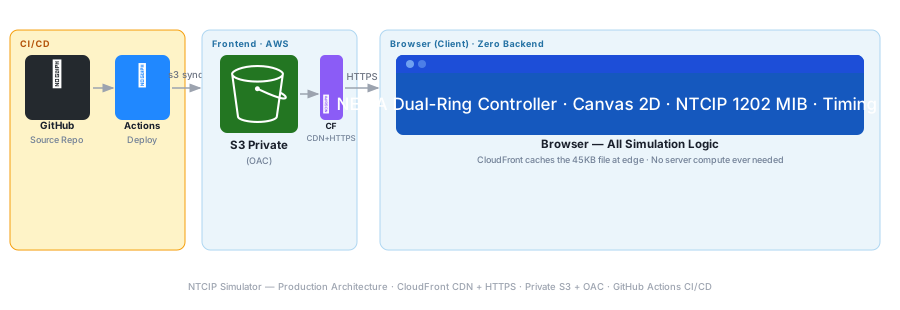
| Transport | HTTP (S3 website endpoint) | HTTPS via CloudFront + ACM certificate | No HTTPS means browsers may warn users; CloudFront provides HTTPS at no extra compute cost |
| Bucket Access | Public-read ACL | Private bucket + CloudFront OAC | Public-read buckets are a common audit finding; OAC gives the same result with less exposure |
| No User Data | No data collected — pure simulation | No change — document this explicitly; no privacy policy required | Zero data collection is the strongest possible privacy posture |
| Content Security Policy | None | CloudFront adds CSP header restricting script sources to self | Prevents script injection attacks; especially important for educational tools that may be shared broadly |
| Area | Current | Production Design | Reasoning |
|---|---|---|---|
| Availability | S3 99.9% SLA | CloudFront edge cache — serves from cache even during S3 disruptions | A single static file cached at edge is effectively always available |
| Browser Compat | Uses Canvas 2D + requestAnimationFrame — broadly supported | Add feature-detection; show fallback message for unsupported browsers | Canvas is supported in all modern browsers; the check is a one-line safeguard |
| Performance on Mobile | Canvas redraws every frame — may be heavy on low-end devices | Throttle to 30fps on mobile via matchMedia detection | 60fps canvas animation on a phone drains battery; 30fps is imperceptible for a signal simulation |
| State Persistence | Timing settings reset on page reload | Save last-used timing plan to localStorage; restore on load | Users exploring timing plans lose their work on refresh; persistence improves the learning experience |
| Area | Current | Production Design | Reasoning |
|---|---|---|---|
| Asset Delivery | S3 us-east-1 — latency scales with distance | CloudFront edge — sub-50ms globally for a 45KB file | Educational tools benefit from fast first load; slow start breaks the learning flow |
| File Size | ~45KB single HTML file, unminified | Minify CSS/JS as CI/CD step; target <28KB | |
| Canvas Rendering | Full redraw every frame including static elements | Split into static layer (road markings) + dynamic layer (signals) using two canvas elements | Reduces GPU work by ~70%; road markings never change between frames |
| Caching | No Cache-Control headers | max-age=3600 via CloudFront; cache-bust on deploy with content hash | Returning users load instantly from cache; deploy hash prevents stale content |
| Area | Current | Production Design | Reasoning |
|---|---|---|---|
| Compute Cost | $0.00 — all simulation runs in the user’s browser | No change — client-side simulation is inherently free to operate | There is no server-side computation to optimize; the architecture is already optimal |
| S3 Cost | <$0.0001/month (one 45KB file) | No change needed | Even at 100K monthly visitors, GET cost for a 45KB file is ~$0.04 |
| CloudFront Cost | Not in use | Free tier: 1TB + 10M requests/month — stays free indefinitely | An educational portfolio tool will never approach CloudFront free tier limits |
| Cost Tagging | No tags on S3 bucket | Tag: Project=ntcip-simulator, Owner=jimmy-hubbard | Consistent tagging enables Cost Explorer breakdown as the project count grows |
| Estimated Monthly | ~$0.00 | ~$0.00 | Pure static hosting with client-side compute — no variable costs |
| Area | Current | Production Design | Reasoning |
|---|---|---|---|
| Compute Footprint | Zero server compute — simulation runs on user’s device | No change — this is the most sustainable compute model possible | No dedicated server runs on behalf of the operator; all energy consumed is on the user’s existing device |
| Data Transfer | 45KB served from us-east-1 | CloudFront edge delivery — shorter path reduces transit energy | Serving from an edge node 50ms away uses less backbone network energy than routing from us-east-1 |
| Frame Rate | 60fps requestAnimationFrame loop | Throttle to 30fps — imperceptible for signal timing simulation | Halving frame rate halves GPU energy consumption on the user’s device with no visible quality loss |
| No Idle Compute | Simulation pauses when browser tab is hidden (browser throttles rAF) | Add Page Visibility API listener to fully stop the loop when tab is hidden | Browsers throttle rAF but don’t stop it; explicit pause eliminates CPU usage on hidden tabs |
| Dimension | Current | Production | Effort |
|---|---|---|---|
| Transport Security | HTTP | HTTPS via CloudFront | Medium |
| Bucket Access | Public-read | Private + OAC | Medium |
| Deployment | Manual upload | GitHub Actions CI/CD | Medium |
| Canvas Layering | Full redraw each frame | Static + dynamic layers | Low |
| State Persistence | Resets on reload | localStorage save/restore | Low |
| Frame Rate | 60fps always | 30fps throttle + tab visibility | Low |
| Caching | No Cache-Control | max-age=3600 + hash | Low |
| Monthly Cost | ~$0.00 | ~$0.00 | No change |
This project taught me more domain knowledge than technical skills. Understanding NEMA dual-ring logic, barrier synchronization, and how timing plans are engineered required working directly with standards documentation—not just writing code. Building it from scratch was the fastest way to truly understand how the system operates.
About: Text to Audio
Type or upload text and get back neural-quality mp3 audio synthesized by AWS Polly. The frontend runs on S3 + CloudFront; a Lambda function behind API Gateway calls Polly’s neural engine and streams the mp3 back to your browser. Ten voices spanning English (US/UK), Spanish (US/Mexico/Spain), French, and German. Cost-controlled with a per-request character cap, an API Gateway throttle, and an AWS Budget alarm.
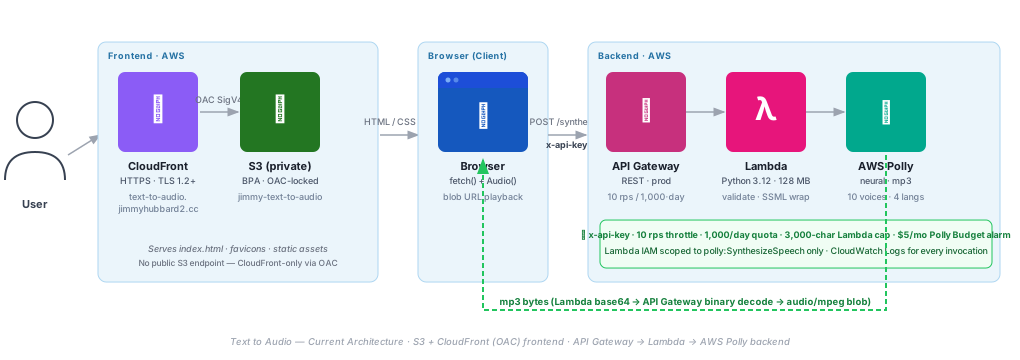
Key fact: Real backend. Real Polly. Real cost controls — Lambda char cap, API Gateway throttle/quota, AWS Budget on Polly service.
| Area | Implementation | Reasoning |
|---|---|---|
| Deployment | GitHub Actions on push to main; Lambda code update gated on git diff HEAD^ HEAD touching lambda_function.py |
Unrelated commits (README, docs) don’t bump Lambda versions — keeps version history meaningful and avoids orphan-version cleanup |
| Manual fallback | deploy.sh with lambda, smoke, resources subcommands |
Documents the resource map in-repo; lets you redeploy Lambda or run an end-to-end probe without a commit |
| Observability | CloudWatch Logs for Lambda; success-path duration (~329 ms) vs validation-reject (~2 ms) makes Polly invocations distinguishable in the log stream | Standard Lambda logs are sufficient at portfolio scale; no paid APM |
| Rollback | Re-push prior commit; Lambda’s previous code lives in $LATEST until the next CI run overwrites it |
Single source of truth via git; no separate rollback procedure to maintain |
| Documentation | README has architecture diagram + cost-controls section + project structure; the same diagram appears in the portfolio panel above | Devs reading the repo and recruiters reading the portfolio see consistent framing |
| Area | Implementation | Reasoning |
|---|---|---|
| Frontend storage | BlockPublicAccess all 4 flags true on jimmy-text-to-audio; bucket policy scoped to cloudfront.amazonaws.com with AWS:SourceArn condition pinned to the distribution |
No raw S3 URL works; only OAC-signed CloudFront requests reach the bucket |
| Transport | CloudFront enforces HTTPS (ViewerProtocolPolicy: redirect-to-https), TLSv1.2_2021 minimum |
HTTP requests are auto-upgraded; no plaintext path for MITM |
| API auth surface | POST /synthesize requires x-api-key; OPTIONS is open as CORS preflight requires |
Single keyed entry point bills Polly only on intentional requests |
| Lambda IAM | AWSLambdaBasicExecutionRole + one inline policy granting only polly:SynthesizeSpeech |
Blast radius of a compromised Lambda = one Polly action; no S3 writes, no IAM, no other AWS services |
| Input validation | Text length ≤ 3,000; voiceId allowlisted to 10 voices; rate regex-validated 20–200%; user text XML-escaped before SSML wrap | Blocks SSML injection; out-of-range or unknown voiceId rejected at 400 with a clear error |
| CORS | Access-Control-Allow-Origin pinned to https://text-to-audio.jimmyhubbard2.cc, not * |
Other origins can’t drive cross-origin POSTs and burn the daily quota |
| Area | Implementation | Reasoning |
|---|---|---|
| Throttle | API Gateway usage plan: rateLimit=10 rps, burstLimit=20 |
One misbehaving client can’t monopolize the API; bursts are smoothed |
| Daily quota | Usage plan quota limit=1000, period=DAY on the prod stage |
Hard daily ceiling at the gateway means abuse is capped without operator intervention |
| Char cap | Lambda rejects text > 3,000 with HTTP 400 and an explicit message, before Polly is called |
Largest single request can’t blow up per-call Polly bill or trip the 30 s timeout |
| Graceful errors | BotoCoreError / ClientError → 502; validation → 400; unexpected → 500. CORS headers on every response, including errors | Browser fetch sees real status codes; the frontend renders the right user-facing message |
| Statelessness | Lambda holds no shared state across invocations; horizontally scales across concurrency without a consistency model | No cache to invalidate, no session to track; simpler operational shape |
| Client cancellation | Frontend uses AbortController on the in-flight fetch + audio.pause() on playback |
User clicks Stop → request cancels cleanly, no orphan audio playing in the background |
| Area | Implementation | Reasoning |
|---|---|---|
| Compute sizing | Lambda 128 MB / 30 s timeout; observed Max Memory Used ≈ 86 MB on the Polly success path | Right-sized — not paying for unused memory; latency-bound by Polly, not local compute |
| Cold start | First invocation ~425 ms init; warm invocations ~329 ms end-to-end (Polly call dominates) | Acceptable for a single-action page; provisioned concurrency would be over-spend at portfolio scale |
| Binary transport | API Gateway with audio/mpeg in binary-media-types decodes base64 → binary on response when the request Accept header matches |
Browser receives a ready-to-play mp3 blob; no client-side base64 decode work |
| Edge caching | CloudFront caches static assets (index.html, favicons); PriceClass_100 (US/CA/EU) |
Repeat visits hit edge cache, not origin S3; geographic regions match the expected traffic profile |
| Engine choice | Polly neural engine (vs standard) |
Higher voice quality at acceptable latency for short text; trade-off accepted for a demo audience |
| Area | Implementation | Reasoning |
|---|---|---|
| Layered cost protection | Three layers: Lambda char cap (3,000), API Gateway throttle + daily quota (10 rps / 1,000/day), AWS Budget alarm ($5/mo Polly) | Single-layer protection is brittle; layered defense bounds worst case at the gateway, Lambda, and bill layers independently |
| Budget alarm | text-to-audio-polly-monthly: $5/mo filtered to Polly service only; FORECASTED 80% + ACTUAL 100% → email |
Forecast notification arrives before actual spend hits the cap; operator has a chance to investigate |
| Worst-case bound | 1,000 requests/day × ~3,000 chars × Polly neural pricing ≈ $48/day max if the quota is fully consumed | Budget at $5/mo with alarm at $4 actual = operator notified well before significant spend accumulates |
| Zero idle cost | Fully serverless — no provisioned concurrency, no reserved EC2, no always-on instances | Cost is purely proportional to usage; 0 invocations = ~$0/mo (just CloudFront request rounding) |
| PriceClass_100 | CloudFront limited to US, Canada, EU edge regions | Cheaper than All-Edge tier; matches expected portfolio traffic geography |
| Area | Implementation | Reasoning |
|---|---|---|
| Serverless | No idle compute; Lambda runs only when a synthesize request arrives | Zero baseline carbon footprint compared to always-on instances |
| Edge caching | CloudFront caches index.html and assets at the edge | Repeat visits don’t re-fetch from origin S3; fewer GET ops, less data movement |
| Output efficiency | Polly mp3 at 48 kbps, 24 kHz, mono | Minimal bytes-per-synthesis; smaller transfers, smaller cache footprints |
| Input throttle (side-effect) | 3,000-char per-request cap | Discourages oversized inputs that would multiply Polly compute and audio storage; modest sustainability win |
| Single-region | All compute in us-east-1; no multi-region replication for a portfolio app |
Avoids carbon cost of cross-region data movement at the cost of regional dependency |
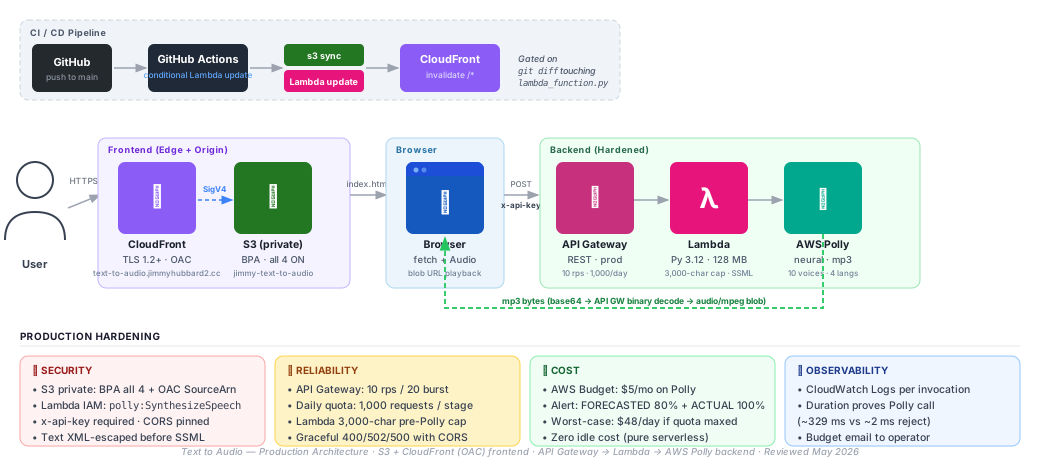
Originally shipped as a Web Speech API frontend; rebuilt as a real AWS Polly backend after recognizing the project name promised more than the implementation delivered. The v1→v2 evolution surfaced several lessons worth keeping.
- API Gateway binary media types. The mp3 round-trip uses base64-in-JSON from Lambda; API Gateway decodes to binary on the way out only when the request
Acceptheader matches a configured binary type. Without it, the browser sees a JSON-shaped string and the audio element chokes. - EDGE propagation lag. A new key↔plan↔stage association takes ~15 s to propagate across the EDGE-optimized API Gateway fleet. The first three with-key requests after linking returned 403 before the fourth at ~17 s succeeded — easy to misdiagnose as a config bug.
apiKeyRequired=trueis inert without a usage plan. Setting the flag on a method without also creating a usage plan with linked keys means the request flows straight through to Lambda. Real enforcement only begins once the usage-plan-key linkage exists.- Defense in depth on cost. A single layer of cost protection is brittle. This project stacks three: Lambda character cap (rejects oversized requests before Polly is invoked), API Gateway throttle + daily quota, and an AWS Budget alarm on the Polly service. Each layer fails differently — together they bound the worst case.
About: Log Analyzer
Upload a server log file and let AI do the heavy lifting. Paste or upload a log, hit Analyze, and within seconds you get a structured report — errors flagged, anomalies spotted, key events summarized. No files stored, no waiting: the log text goes directly to a Lambda function via a secure Function URL, which sends it to the Anthropic API (Claude Haiku) for analysis. Results come back in the same request.
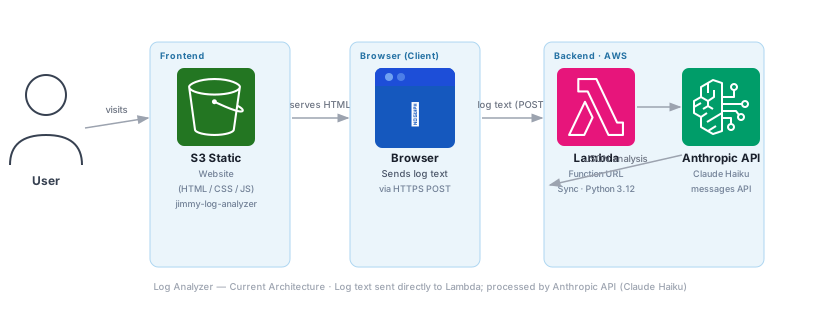
Key fact: No API Gateway. Log text is sent directly in the POST body to a Lambda Function URL. Claude Haiku performs the analysis synchronously via the Anthropic API and the result is returned in the HTTP response — no S3 storage of results.
| Area | Current | Production Design | Reasoning |
|---|---|---|---|
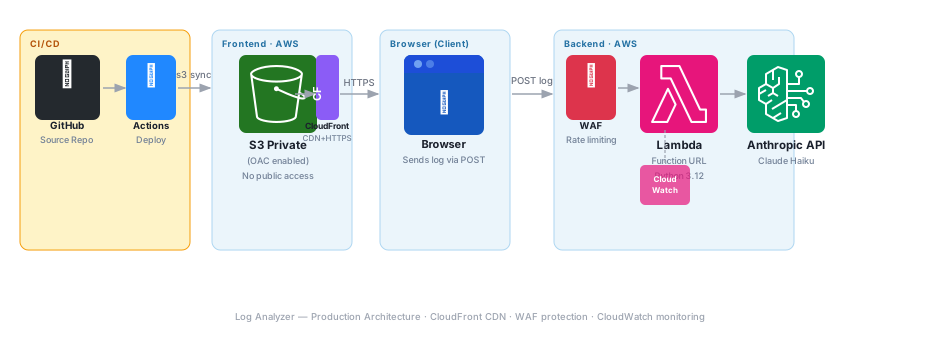
| Deployment | Manual S3 upload + manual Lambda zip deploy via CLI | GitHub Actions: aws s3 sync for frontend, aws lambda update-function-code for backend on every push to main |
Ties every production change to a commit; eliminates manual steps that can drift |
| Rollback | Re-upload previous zip manually | S3 Versioning on frontend; Lambda publishes versioned aliases — rollback with one alias pointer update | Versioned aliases allow instant rollback without redeployment |
| Observability | Lambda logs to CloudWatch Logs automatically; no custom metrics | Structured JSON logging from Lambda; custom CloudWatch metric for analysis latency; dashboard for request volume and error rate | Structured logs enable CloudWatch Insights queries; latency metric catches API degradation early |
| Health Check | No external check | UptimeRobot pings the S3 website endpoint every 5 min; synthetic canary hits Lambda Function URL with a test payload | Both frontend and backend need independent health verification |
| Area | Current | Production Design | Reasoning |
|---|---|---|---|
| Transport | Frontend: HTTP (S3 website). Lambda URL: HTTPS (always) | CloudFront for frontend — HTTPS enforced; Lambda URL keeps native HTTPS | HTTP frontend exposes users to MITM; CloudFront provides HTTPS termination for S3 |
| Lambda Auth | Function URL AuthType: NONE — publicly callable by anyone | WAF rule group on Function URL: IP rate limit 100 req/5 min per IP; block payloads > 500KB | Open Function URLs are abusable for prompt injection and cost attacks; WAF provides the cheapest protection layer |
| Input Validation | Log text truncated at 50,000 chars; no content-type check | Lambda validates Content-Type: application/json; rejects payloads missing required fields; strips non-UTF-8 bytes | Malformed input can cause confusing API errors or silent truncation |
| IAM Role | No AWS IAM permissions needed for AI inference; Anthropic API key stored as encrypted Lambda environment variable | API key rotation via Anthropic console; Lambda env var updated with aws lambda update-function-configuration |
Storing the API key in an environment variable keeps it server-side and never exposed to the browser |
| Bucket Access | Public-read for static hosting | Private bucket + CloudFront OAC | Public-read buckets are a common misconfiguration target |
| Area | Current | Production Design | Reasoning |
|---|---|---|---|
| API Timeouts | Lambda timeout 30s; Anthropic API typically responds in 3–8s for standard logs | Set max_tokens cap; chunk logs > 20K tokens before sending; return partial analysis if chunked |
Claude Haiku has context limits; oversized payloads cause errors or silent truncation |
| Lambda Cold Start | Cold starts possible after idle periods — adds 200–500ms | Lambda SnapStart (if Python support available) or provisioned concurrency for one warm instance | Log analysis is latency-sensitive from a UX perspective; warm instances eliminate cold-start variance |
| Error Handling | Unhandled API exceptions bubble to frontend as 500 | Try/except around Anthropic API call; return structured error JSON with retry guidance; CloudWatch alarm on Lambda errors | Users need actionable error messages; unhandled exceptions waste debugging time |
| Availability | S3 99.9% SLA; Lambda 99.95%; Anthropic API 99.9%+ | CloudFront edges serve cached frontend during S3 disruptions; Anthropic API has strong uptime SLA; no AWS service dependency for AI inference | Anthropic API availability is independent of AWS regional issues |
| Area | Current | Production Design | Reasoning |
|---|---|---|---|
| Lambda Memory | Default 128MB | Benchmark at 256MB and 512MB — Lambda CPU scales with memory; JSON parsing is CPU-bound | Doubling memory often cuts execution time by 40%+ for CPU-heavy work, at minimal cost increase |
| AI Model | Claude Haiku — fast, cost-effective | No change for standard logs; optionally route logs > 10K chars to Claude Sonnet for deeper analysis | Claude Haiku handles most logs well; Sonnet only justified for very large or complex log files |
| Frontend Delivery | S3 us-east-1 — latency grows with user distance | CloudFront edge caching — sub-50ms load times globally for the static HTML | Frontend is trivially cacheable; edge delivery is free within CloudFront free tier |
| Payload Size | Full log text sent in POST body; no compression | Frontend gzip-encodes POST body before send; Lambda reads Content-Encoding: gzip | Log files compress 80-90%; reduces transfer time and Lambda ingress processing |
| Area | Current | Production Design | Reasoning |
|---|---|---|---|
| Anthropic API Cost | Claude Haiku: $0.80/MTok input, $4.00/MTok output | Spending limit set in Anthropic console; token cap in Lambda prevents runaway costs on huge logs | A 10,000-char log ≈ 2,500 tokens ≈ $0.002 per analysis. 1,000 analyses/month ≈ $2.00 |
| Lambda Cost | First 1M requests/month free; 400K GB-seconds free | Stays within free tier at personal-project scale | Even at 10,000 analyses/month with 5s average duration at 128MB = well within free tier |
| S3 Cost | Frontend only; no result storage | No change — no result S3 bucket needed; results returned in response body | Synchronous response model avoids all S3 result-storage costs |
| Cost Tagging | No resource tags | Tag Lambda and S3 with Project=log-analyzer, Owner=jimmy-hubbard |
Enables Cost Explorer breakdown as project count grows |
| Estimated Monthly | ~$2.00–$5.00 at low volume | ~$2.00–$5.00 at low volume (dominated by Anthropic API token cost) | CloudFront, Lambda, and S3 all stay in free tier; Anthropic API is the only variable cost |
| Area | Current | Production Design | Reasoning |
|---|---|---|---|
| Compute Model | Serverless Lambda — runs only during request, zero idle | No change — serverless is the most sustainable compute model | No EC2 running 24/7; compute consumed only when users actually analyze logs |
| Model Efficiency | Claude Haiku — one of Anthropic’s most efficient models | No change; prefer Haiku over larger models unless quality requires upgrade | Smaller models consume less compute per token — same output, lower carbon per analysis |
| Data Transfer | Log text travels us-east-1 → Lambda → Anthropic API (external HTTPS call) | Lambda stays in us-east-1; Anthropic API call is an external HTTPS request | Log text is the only external data transferred; results are returned in the same request |
| Right-Sizing | Default Lambda memory; may be over-provisioned | Benchmark optimal memory setting — right-size to avoid waste | Over-provisioned Lambda wastes compute resources on every invocation |
| Dimension | Current | Production | Effort |
|---|---|---|---|
| Frontend Transport | HTTP (S3 website) | HTTPS via CloudFront + ACM | Medium |
| Bucket Access | Public-read | Private + CloudFront OAC | Medium |
| Function URL Protection | None | WAF rate limit + payload size rule | Medium |
| IAM Scope | API key in Lambda env variable | No AWS IAM model permissions needed | Low |
| Deployment | Manual CLI | GitHub Actions CI/CD | Medium |
| Observability | Default CloudWatch Logs only | Structured JSON logs + custom metrics | Low |
| Error Handling | Unhandled exceptions → 500 | Structured error responses + alarms | Low |
| Lambda Memory | 128MB default | Benchmarked optimal size | Low |
| Log Chunking | Truncate at 50K chars | Token-aware chunking with partial results | Medium |
| Estimated Monthly Cost | ~$0.10–$0.50 | ~$0.10–$0.50 | No change |
This was my first time connecting a frontend directly to a Lambda Function URL without API Gateway. Configuring CORS correctly, structuring requests to the Anthropic API, and keeping the flow synchronous gave me a solid understanding of how serverless functions handle real-time AI calls. I also learned how to craft prompts that consistently produce structured, useful outputs instead of generic text.
About: AI Resume ↔ Job Matcher
Job hunting is a numbers game — but most people apply blind. This tool makes the process smarter. Upload your resume and paste in a job description, and Claude does what a recruiter does in 10 seconds: compares the two, reasons through the fit, and gives you something actionable.
Claude returns a match score, a breakdown of missing skills you could address, and a list of strengths that directly align with the role. No fluff — just signal.
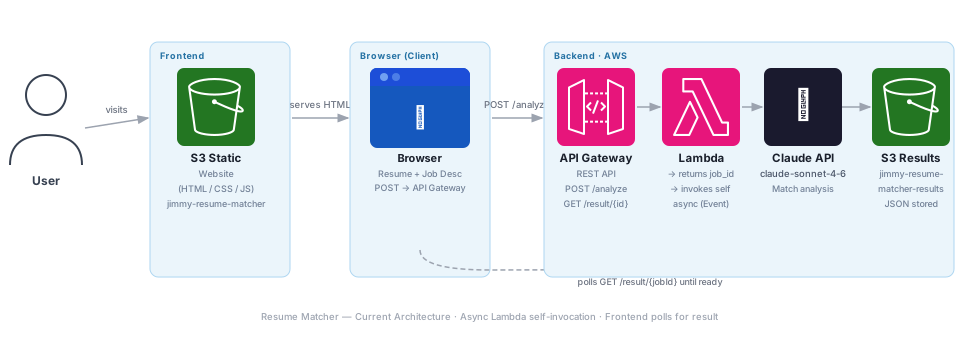
Key fact: Async architecture — POST /analyze returns a job_id immediately. Lambda invokes itself with
InvocationType=Event, runs pypdf + Claude API, stores JSON result in S3. Frontend polls GET /result/{jobId} every 2s until complete.| Area | Current | Production Design | Reasoning |
|---|---|---|---|
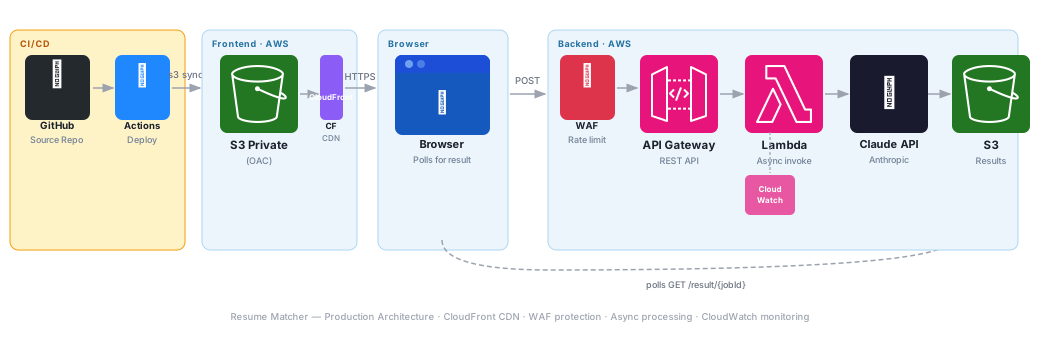
| Deployment | Manual Lambda zip deploy + manual S3 upload | GitHub Actions: package Lambda layer (pypdf), deploy function code, sync frontend — all triggered by push to main | Multi-component deploys (frontend + Lambda + dependencies) are error-prone manually; CI/CD ties every change to a commit |
| Dependency Management | pypdf bundled in Lambda zip; manual version updates | Lambda Layer for pypdf — shared across function versions; Dependabot PR for version bumps | Layers allow dependency updates without repackaging the entire function |
| Rollback | Re-upload previous zip manually | Lambda versioned aliases (prod → stable version); one alias pointer update to rollback | Instant rollback without redeployment; traffic routing between versions possible for canary releases |
| Observability | Lambda CloudWatch Logs; API Gateway access logs disabled | Enable API Gateway execution + access logs; structured JSON from Lambda; CloudWatch dashboard: request rate, 4xx/5xx, async success rate, Claude API latency | Async architecture is harder to debug — structured logs with job_id correlation are essential |
| Dead-Letter Queue | None — failed async invocations silently lost | SQS DLQ on async Lambda destination; CloudWatch alarm fires if DLQ depth > 0 | Without DLQ, a Claude API timeout or PDF parse error leaves the user polling forever with no result |
| Area | Current | Production Design | Reasoning |
|---|---|---|---|
| API Key Exposure | Anthropic API key stored in Lambda environment variable (unencrypted by default) | Store API key in AWS Secrets Manager; Lambda retrieves at runtime via SDK call; rotate on schedule | Environment variable secrets are visible in console and CloudTrail; Secrets Manager adds encryption, audit trail, and rotation |
| API Gateway Auth | No auth — POST /analyze is open to anyone | API key required in request header (x-api-key); WAF rate limit: 20 requests/5 min per IP | Open endpoints can be abused for API cost attacks; Anthropic API calls are not free |
| Input Validation | PDF uploaded directly; no file-type validation or size limit enforced server-side | Lambda validates Content-Type, rejects files > 5MB, runs pypdf in try/except with meaningful error response | Malicious PDF uploads are a known attack vector; size limits prevent cost abuse |
| S3 Results Bucket | Public-read disabled but no explicit bucket policy | Explicit deny-all public access; ore-signed URLs for result retrieval instead of key-based polling | Key-based polling with predictable job_id is guessable; pre-signed URLs expire and are unforgeable |
| Transport | Frontend HTTP (S3 website); API Gateway HTTPS | CloudFront for frontend — HTTPS end-to-end | HTTP frontend breaks the security chain; MITM can intercept the job_id or inject fake results |
| IAM Roles | Lambda role scope unknown | Least-privilege: Lambda allowed only s3:PutObject on results bucket prefix, lambda:InvokeFunction on self ARN, secretsmanager:GetSecretValue on specific secret |
Over-permissioned Lambda roles are the most common serverless security finding |
| Area | Current | Production Design | Reasoning |
|---|---|---|---|
| Async Failure Visibility | Failed async invocations are silent — user polls forever | DLQ captures failures; Lambda writes error JSON to results bucket so frontend polling gets a clear error state | The async pattern requires explicit failure signaling; silence is not an acceptable failure mode |
| Claude API Reliability | Single call; no retry logic | Exponential backoff with 3 retries on Claude API 529 (overloaded) errors; timeout set to 90s | Claude API can return 529 under load; retries with backoff recover automatically without user action |
| PDF Parse Errors | pypdf exception propagates; async invocation fails silently | Try/except around pypdf; if parse fails, attempt plain-text extraction as fallback; return structured error if both fail | Scanned PDFs (image-only) are common; graceful fallback improves user experience significantly |
| Result Expiry | Results stored indefinitely in S3 | S3 Lifecycle rule: delete results after 24 hours | Old results waste storage and contain PII (resume content); auto-expiry is both cost and privacy best practice |
| Polling Timeout | Frontend polls until page close; no timeout shown | Frontend stops polling after 3 minutes and shows error with retry button | Infinite polling is poor UX; bounded wait with clear feedback is the correct pattern |
| Area | Current | Production Design | Reasoning |
|---|---|---|---|
| Lambda Memory | 512MB — set for pypdf PDF processing | Profile with AWS Lambda Power Tuning tool; 512MB is likely near-optimal for mixed pypdf + API work | pypdf is memory-bound; 512MB is reasonable but should be validated against real-world PDFs |
| Claude Prompt | Full resume + full JD sent in single message | Trim whitespace; strip duplicate blank lines from PDFs before sending; cap at 6,000 words per input | Cleaner input → fewer tokens → faster response → lower cost; Claude performs better on clean text |
| Polling Interval | 2-second polling — 90 GET requests over 3 minutes | Exponential backoff: poll at 2s, 4s, 8s, 8s, 8s… — reduces API Gateway calls by ~60% | Claude processing averages 8–15s; 2s intervals generate unnecessary API Gateway traffic |
| Response Caching | No caching — identical resume+JD combos re-invoke Claude | Hash resume+JD; check S3 results bucket for existing hash match before invoking Claude | Same user re-submitting unchanged resume saves 100% of Claude API cost and returns instantly |
| Frontend Delivery | S3 us-east-1 — latency grows with distance | CloudFront edge caching for the single-page HTML | Frontend is static; edge delivery adds zero runtime cost and improves global load time |
| Area | Current | Production Design | Reasoning |
|---|---|---|---|
| Claude API Cost | claude-sonnet-4-6: $3/1M input, $15/1M output tokens | Add token budget to system prompt; cap analysis to 1,000 output tokens — sufficient for score + bullets | Resume+JD analysis rarely requires more than 800 tokens of output; capping prevents verbose responses that add cost |
| Lambda Cost | 512MB · ~15s avg = 7.5GB-seconds per analysis | Free tier: 400K GB-seconds/month = ~53,000 free analyses/month | Personal project volume stays deep in free tier indefinitely |
| API Gateway Cost | First 1M calls/month free (REST API) | No change — stays in free tier at personal scale | Even 10,000 analyses/month × 50 polling calls each = 500K calls — within free tier |
| S3 Results Cost | Small JSON files stored indefinitely | 24-hour lifecycle expiry; trivial storage cost even without expiry | Each result JSON is <10KB; 10,000 stored results = 100MB = ~$0.002/month |
| Estimated Monthly | ~$0.03–$0.15 per 10 analyses (dominated by Claude API) | ~$0.02–$0.12 per 10 analyses (output token cap reduces cost 20-30%) | Claude API is the only meaningful cost driver at personal-project scale |
| Area | Current | Production Design | Reasoning |
|---|---|---|---|
| Compute Model | Serverless Lambda — zero idle compute | No change — serverless is the correct sustainability choice | Lambda runs only during active requests; no EC2 consuming power between analyses |
| Model Efficiency | claude-sonnet-4-6 — strong balance of capability and efficiency | Evaluate claude-haiku-4-5 for simpler match tasks — 10x fewer compute resources per token | For structured scoring tasks, Haiku may produce equivalent quality at a fraction of the compute cost |
| Data Retention | Resume and JD content stored indefinitely in Lambda logs | Set CloudWatch log group retention to 7 days; enable S3 result expiry | PII in logs retained beyond necessity is both a privacy and sustainability concern — shorter retention = less storage energy |
| Regional Processing | All services in us-east-1; Anthropic API call goes to external network | No change — no AWS alternative to Anthropic API; keep all AWS resources in single region | Single-region eliminates cross-region data transfer energy; Anthropic API is the only necessary external call |
| Dimension | Current | Production | Effort |
|---|---|---|---|
| API Key Security | Lambda env var | Secrets Manager + rotation | Medium |
| API Auth | None (open endpoint) | API key + WAF rate limit | Medium |
| Frontend Transport | HTTP | HTTPS via CloudFront | Medium |
| Async Failure Handling | Silent (user polls forever) | DLQ + error result written to S3 | Medium |
| Claude API Retry | None | Exponential backoff, 3 retries | Low |
| IAM Scope | Unknown / broad | Least-privilege per resource | Low |
| PDF Error Handling | Exception propagates silently | Structured error + fallback extraction | Low |
| Result Expiry | Indefinite | 24-hour S3 Lifecycle rule | Low |
| Polling Efficiency | Fixed 2s interval | Exponential backoff polling | Low |
| Output Token Cap | None | 1,000 token output limit | Low |
| Deployment | Manual | GitHub Actions CI/CD | Medium |
| Estimated Monthly Cost | ~$0.03–$0.15 per 10 analyses | ~$0.02–$0.12 per 10 analyses | Minor improvement |
Getting consistent, structured comparisons from the AI required careful prompt engineering. I also focused more on the end user—someone likely stressed during a job search—which pushed me to make outputs clear, concise, and actionable rather than just technically correct.
About: Live Traffic Dashboard
A live traffic incident map across U.S. cities built with Leaflet.js and OpenStreetMap. Attempts the TxDOT 511 public API on every load, falling back to simulated demo data. Incidents are color-coded by type (accidents, construction, hazards, closures) and can be filtered and searched in real time from the sidebar.
The map auto-refreshes every 45 seconds. Clicking a sidebar card pans and zooms to that marker; clicking a marker highlights the card. Fully client-side — no backend required.
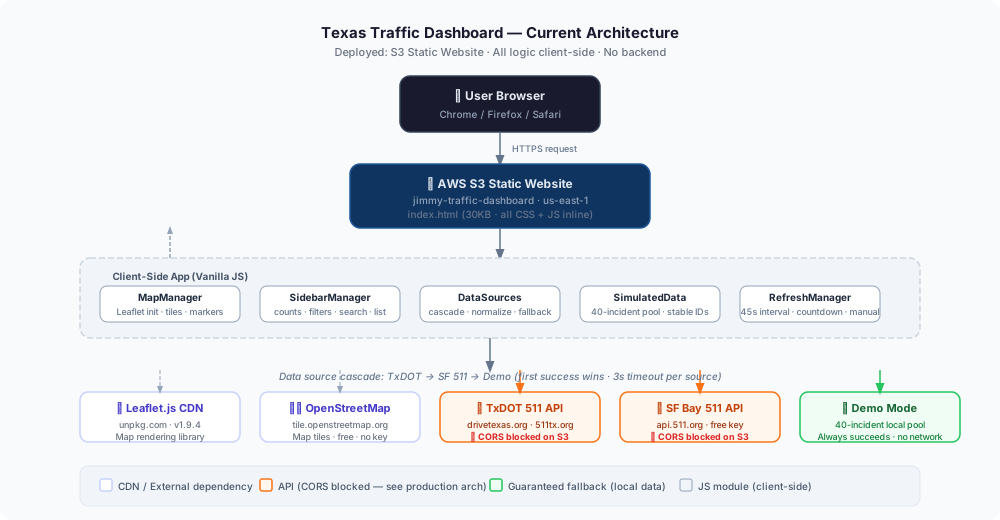
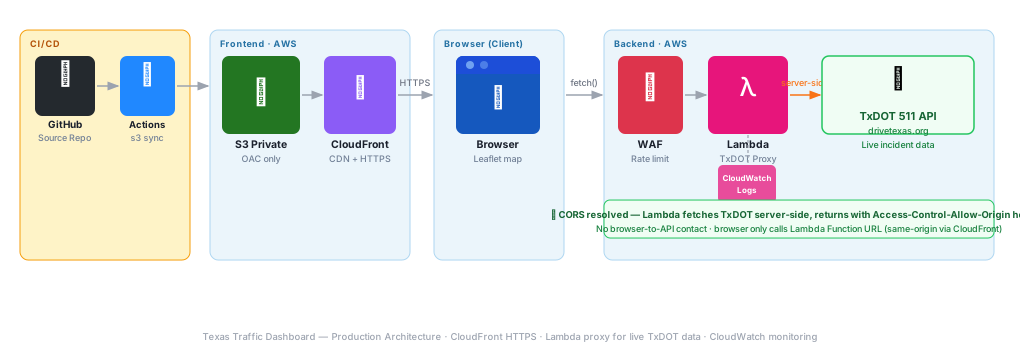
Key fact: Fully client-side — no backend. TxDOT 511 and SF Bay 511 API calls are CORS-blocked from S3. The app falls back to a 40-incident simulated data pool that churns on every refresh. Lambda proxy for live data is deferred until CloudFront HTTPS is active.
| Area | Current | Production Design | Reasoning |
|---|---|---|---|
| Deployment | GitHub Actions pushes index.html to S3 on every merge to main | Same pipeline extended: after S3 sync, invalidate CloudFront distribution to flush cached HTML | Without a cache invalidation step, users may see a stale version for up to 24 hours after deployment |
| Rollback | Re-push previous commit; Actions redeploys | Enable S3 Versioning — restore prior object version in one CLI command without needing a full re-deploy | Versioning decouples rollback from the git pipeline; useful when the pipeline itself is the problem |
| Observability | No logging — fully client-side, no server to instrument | CloudFront access logs to S3; Lambda proxy logs structured JSON to CloudWatch (source attempted, latency, status code) | CloudFront logs reveal 4xx/5xx rates and geographic traffic patterns; Lambda logs expose TxDOT API reliability over time |
| Health Check | No external monitoring | UptimeRobot monitors the CloudFront URL every 5 minutes; alert on HTTP non-200 | Detects S3/CloudFront outages before users report them |
| Area | Current | Production Design | Reasoning |
|---|---|---|---|
| Transport | HTTP only — S3 static website does not support HTTPS | CloudFront distribution with ACM certificate — HTTPS enforced, HTTP redirected; S3 bucket made private with OAC | HTTP exposes users to MITM and triggers browser security warnings; private S3 with OAC closes the direct-access bypass |
| Bucket Access | Public-read bucket policy required for S3 website hosting | Block all public access; CloudFront Origin Access Control (OAC) is the only authorized principal | Public-read buckets are a top misconfiguration finding; OAC enforces that all requests go through CloudFront |
| Lambda Proxy Auth | N/A — no backend yet | Lambda Function URL with AuthType NONE; WAF rule group applies IP rate limit (60 req/min per IP) to prevent abuse | Open Function URLs without WAF are trivially abusable for cost amplification attacks |
| API Key Storage | N/A — TxDOT 511 public endpoint used directly (no key required currently) | If TxDOT adds API key requirement: store in AWS Secrets Manager; Lambda retrieves at cold-start and caches in memory | Never hardcode API keys in Lambda environment variables — Secrets Manager provides rotation and audit trail |
| XSS Prevention | All incident fields passed through esc() helper before insertion into DOM | Maintain esc() on all data-driven HTML; add Content-Security-Policy header via CloudFront response policy | CSP header provides defense-in-depth against injected scripts even if an esc() call is missed |
| Area | Current | Production Design | Reasoning |
|---|---|---|---|
| Data Fallback | 3-source cascade: TxDOT → SF Bay 511 → Simulated demo; demo always succeeds | Same cascade maintained via Lambda proxy; Lambda itself returns cached last-good data if TxDOT API is unreachable for > 2 consecutive calls | TxDOT 511 has unpredictable uptime; stale-cache fallback ensures the map always shows something meaningful |
| CDN Dependency | Leaflet.js loaded from unpkg.com CDN on every page load | Self-host Leaflet assets in the S3 bucket alongside index.html; served via CloudFront | Third-party CDN outage (unpkg.com) currently takes down the entire map; self-hosting eliminates this single point of failure |
| Refresh Resilience | 45-second auto-refresh; failed refreshes silently keep showing last data | Add exponential backoff (45s → 90s → 180s) after consecutive Lambda errors; toast notification when data is stale | Silent failures confuse users; backoff reduces hammering a degraded backend |
| Availability | S3 website: 99.9% SLA; no multi-region | CloudFront edge caching provides effectively global availability even during brief S3 origin hiccups | Static assets cached at CloudFront edge means S3 origin can be briefly unavailable with no user impact |
| Area | Current | Production Design | Reasoning |
|---|---|---|---|
| Asset Delivery | Single 30KB HTML file served from S3 us-east-1 origin | CloudFront edge delivery — users get the file from the nearest PoP; typical cache-hit latency < 10ms | S3 origin delivery from us-east-1 adds 50–200ms round-trip for users outside the east coast |
| Map Tiles | OpenStreetMap tiles loaded on demand; free, no SLA | Evaluate MapTiler or Stadia Maps for a tile CDN with SLA and higher rate limits as traffic grows | OpenStreetMap’s tile policy prohibits high-traffic commercial use; paid tile CDN avoids rate limiting |
| Lambda Cold Start | N/A — no Lambda yet | Python Lambda, minimal dependencies — cold start target < 400ms; provisioned concurrency not needed at personal-project scale | Cold starts only matter on first request after idle; 45-second refresh cadence keeps Lambda warm during active sessions |
| Bundle Size | All CSS + JS inline in 30KB HTML; Leaflet loaded separately from CDN | Keep inline bundle; compress with gzip via CloudFront — typical savings 60–70% on a JS-heavy file | CloudFront gzip compression is one checkbox; no build step required for a single-file app |
| Area | Current | Production Design | Reasoning |
|---|---|---|---|
| S3 Hosting | ~$0.00/month — single 30KB file, minimal requests | No change — S3 costs negligible at personal-project scale | S3 storage is $0.023/GB; a 30KB file costs essentially $0 |
| Lambda Proxy | N/A | Lambda free tier: 1M requests/month + 400,000 GB-seconds compute free. At 45s refresh per user, 100 daily active users = ~192K req/month — well within free tier | Lambda proxy is effectively free at personal portfolio scale; no cost concern |
| CloudFront | N/A — HTTP S3 only | CloudFront free tier: 1TB data transfer + 10M HTTP requests/month. 30KB file × 10K monthly visits = ~0.3GB — well within free tier | CloudFront adds HTTPS, CDN speed, and OAC security at $0 for this traffic level |
| Map Tiles | OpenStreetMap: free | Keep OpenStreetMap for portfolio use (low traffic); monitor tile request rate as usage grows | OpenStreetMap is free for low-traffic non-commercial use; paid alternative only needed at scale |
Public APIs are often far messier than their documentation suggests. Designing a fallback cascade—live feed → secondary source → simulated data—taught me how to build resilient data pipelines that don’t fail when external sources do. Using Leaflet.js for real-time map rendering also pushed me to think more critically about performance as data updates.